|
 |
 |
 |
 |
 |
 |
| Product Video |
|
|
|
.jpg) |
.jpg) |
Click on button to watch a video describing the main features. |
| User Manual |
|
|
|
|
|
Click on link to go to User Manuals page. |
| Free download |
|
|
|
|
|
Click on the "Download" button below, and follow instructions to install the application on your computer. |
| Easy to use |
|
|
|
|
|
All commands are self-evident, and can be quickly reviewed by reading the roll-over tool-tips, or by watching the product Video. For more details, consult the User Manual. |
| Speedy editing |
|
|
|
|
|
Most editing functions have a keyboard shortcut, to allow for speedy composing and editing. Shortcut reminders are available in a convenient drop-down menu. |
| Open .HAB files |
|
|
|
|
|
Get .HAB files from the Sample File Repository. |
| Nudge notes |
|
|
|
|
|
Move notes along the chromatic scale, and hear changes in the resulting chord. Ideal for exploring complex harmonies in chorale format. |
| Split & meld notes |
|
|
|
|
|
Note insertion is based on the two basic divisions in music: binary and ternary. Ideal for exploring complex rhythms utilizing any combination of binary and ternary note divisions. |
| Ready-made chords |
|
|
|
|
|
Chords can be added automatically in relation to Key, providing a framework for composition. |
| 7 navigation modes |
|
|
|
|
|
Hear the score using one of 7 navigation modes (Note-wise, Step-wise, Snapshot, Go To, Rapid Scroll, Line-Flip and Cinematic), enabling full control of what is heard while composing and editing. |
| Cross-platform |
|
|
|
|
|
This application is written in Java, so will run on any operating system (Windows, Mac, Linux) that has Java 5.1 (or higher) installed on it. Get Java here. |
| Upgradeable |
|
|
|
|
|
Activate additional features by upgrading to higher versions of HarmonyBuilder, using the "Upgrade" menu in the application's menu bar. |
| Save song files |
|
|
|
|
|
Save song files to your hard drive or public web archive. Also, save in MIDI format. |
| Save Forum files |
|
|
|
|
|
Save compositions in the HarmonyHub Forum to your hard drive. |
| Save/Edit Archive files |
|
|
|
|
|
Save compositions in the HarmonyHub public archive to your hard drive, and re-edit them. |
| Text tool |
|
|
|
|
|
Comments, chord symbols, lyrics, etc. can be added to the score. |
| Line Tool |
|
|
|
|
|
Add lines to score, to indicate specific notes or chords. |
| E-mail composition hyperlink |
|
|
|
|
|
E-mail a private hyperlink, to any number of friends, that will open the composition directly in a browser. |
| Error Checking |
|
|
|
|
|
As you compose, color-coded markings will appear over voice-leading errors, like parallel and hidden 5ths and 8ves; the incorrect motion of 7ths, diminished 5ths, and leading-tones; surpassed note range limits; excessive intervals between notes; and more. See User Manual for complete descriptions. |
| Automatic Chord Recognition |
|
|
|
|
|
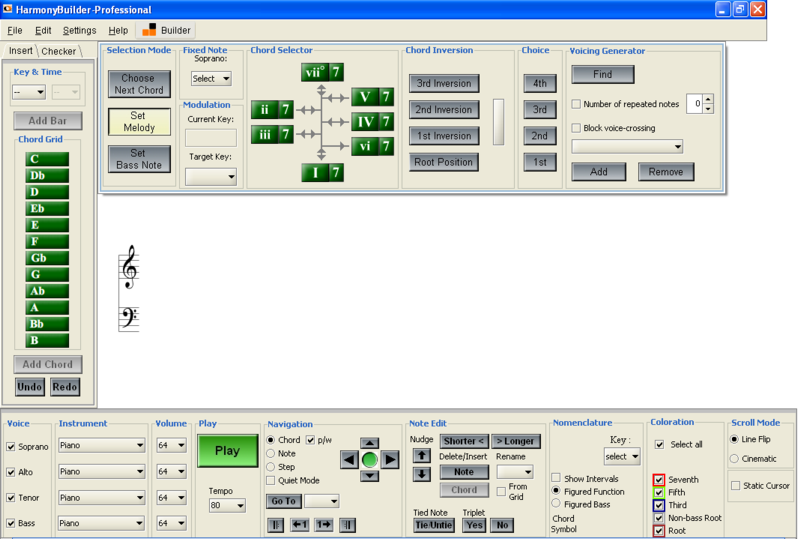
All scale chords are recognized by the program, and described in a Nomenclature panel, both in Figured Bass notation and Chord Symbol notation. Also, exact intervals between adjacent notes are shown. |
| Error Printing |
|
|
|
|
|
Any combination of errors can be selected for printing to paper or PDF. Teachers can then return corrected homework to their students as a printout or a PDF attached to an e-mail. |
| Color Snapshot |
|
|
|
|
|
When in Snapshot navigation mode, the function of each chord note (root, 3rd, 5th, 7th) can be color-coded for easy recognition. This is very useful for creating chord extensions! |
| Chord Voicing Generator |
|
|
|
|
|
The program lists all possible permutations of note positions (i.e. voicings), within a user-defined range, for each selected "next" chord. |
| Error Filtering |
|
|
|
|
|
All chords that contain voice-leading errors with the "previous" chord can be filtered out of the options list. Also included are a voice-crossing filter and repeated-note filter. |
| Find Next Chord |
|
|
|
|
|
All triads and seventh chords (from both major and minor scales) can be selected from a chord wheel, together with their inversion and voicing choice. |
| Suggestion Window |
|
|
|
|
|
This feature shows the best options for the "next" chord, based on the "previous" chord. |
| Visual and Aural Feedback |
|
|
|
|
|
Each potential "next" chord is presented both as a sound and a color combination, helping the user choose the best "next" chord in the composition. |
| Set Melody |
|
|
|
|
|
This feature allows users to fix a melody note for each chord, and list all voicing options having that melody note, including those found in other keys! Excellent for the reharmonizing a given melody. |
| Set Bass Note |
|
|
|
|
|
This feature allows users to determine the bass note of each successive chord, and list all chord and key options! Excellent for creating or resolving Figured Bass excercises. |
| Personal Online Score Database |
|
|
|
|
|
Sudents or teachers can log in to a password-protected personal online account to save or retreive their scores. |
| Dedicated Forum |
|
|
|
|
|
Personalized forum with full control over Forum Categories and database. |
| Activation Cost |
Free |
$30 |
$130 |
$300 |
|
Note: upgrading any version will discount payments already made for prior version(s). |
| Download |
|
|
|
|
|
Download the installer for HarmonyBuilder (Demo). Upgrade from inside the Demo to obtain functionality of other versions. |
| Purchase Activation Key |
|
|
|
|
|
Secure online payment via PayPal or Credit Card. |